Panda Office

Panda Office

3.6

Panda Office is a China-based creative template and AI productivity platform.

Tags
AI PPTai-writingtemplate-librarypdf-conversionoffice-productivity
Last Updated Nov 25, 2026
Panda Office screenshot

About

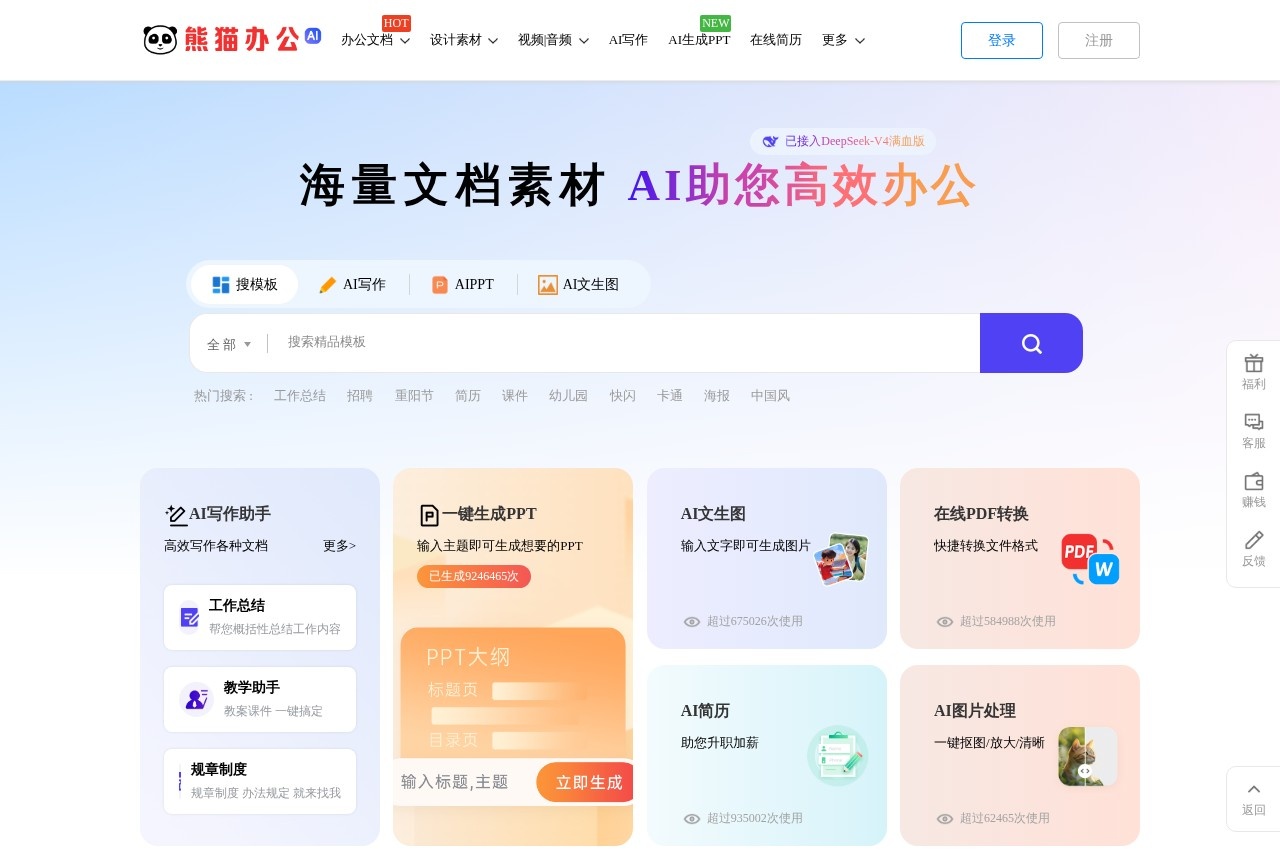
Panda Office is a Chinese website that combines a large collection of ready-made office and design templates with a set of AI tools to help users create documents and visual materials. It targets common workplace pain points: creating presentations, reports, resumes, posters, and videos from scratch is time-consuming, and many users need editable starting points or simply prefer automated generation.

The platform is divided into two parts. One is a downloadable asset library covering PPT templates, Word documents, Excel spreadsheets, design elements with transparent backgrounds, backgrounds, illustrations, photography, fonts, video templates, sound effects, and royalty-free music. The other is a suite of AI services, including writing assistance, one-click PPT generation from a topic, text-to-image generation, AI resume creation, image processing (background removal, upscaling, sharpening), and online PDF conversion. The website states that its AI features are powered by the DeepSeek model. Panda Office has been operating since 2017 and is registered in Shanghai.

Key Features

AI Writing Assistant: Generates work summaries, lesson plans, company policies, and more based on prompts, with support for web search, deep reasoning, and knowledge base Q&A.
One-Click PPT Generation: Users enter a topic and get a presentation; the site shows over 9.2 million generations.
AI Text-to-Image: Turns text descriptions into images, with over 675,000 recorded uses.
AI Resume Builder: Creates job-seeking resumes; the site shows over 935,000 uses.
Online PDF Conversion: Converts file formats directly in the browser, with approximately 585,000 recorded uses.
AI Image Processing: Upload an image to instantly remove backgrounds, upscale, and sharpen.
Templates & Asset Library: Includes work summary and training PPT templates, Word resumes and newsletters, Excel spreadsheets for payroll and inventory, posters, background-free elements, AE and PR video templates, fonts, sound effects, and royalty-free music, updated daily.

Who It's For

Panda Office is designed for Chinese office users who frequently create presentations, reports, and spreadsheets and want to boost efficiency with editable templates or AI generation. Teachers can use educational courseware templates and a teaching assistant; HR and administrative staff benefit from spreadsheet templates for resumes, attendance, payroll, and inventory; small businesses and marketers can leverage poster and advertising design assets, while video creators get AE and PR templates as well as licensed music and sound effects.

FAQ

What is Panda Office?It is a Chinese template platform and AI tool collection offering PPT, Word, and Excel templates, design and media assets, as well as AI tools for writing, PPT generation, images, resumes, and PDF conversion.

Is Panda Office free?The website requires account registration to provide downloads and AI tools, but the pages reviewed do not disclose pricing; for current membership and plan details, please check tukuppt.com.

What AI features does Panda Office include?It includes an AI writing assistant, topic-based PPT generation, text-to-image, AI resume creation, AI image processing (background removal, upscaling, sharpening), and online PDF conversion.

Does Panda Office support English?The website's content, categories, and tools are all presented in Chinese, which may make it difficult for users unfamiliar with Chinese to use.

What types of templates can be downloaded?Templates cover work summary and training PPTs, Word resumes and newsletters, Excel payroll and inventory spreadsheets, posters, PNG cutouts, backgrounds, fonts, AE/PR video templates, and audio assets.

More

Key Advantages

  • Pricing: Pricing is not publicly listed on the pages we reviewed; please visit the official website for current plans.
  • Login & Accounts: Supports registration and login via phone number, QQ, and WeChat QR code scanning; an account is required to download assets and use AI tools.
  • Customer Support: Online customer service is available from 9:00 to 22:00 site time, with an additional help center and feedback channels.
  • Target Market: All content and the interface are in Chinese, primarily targeting users in mainland China.